eRoute Generation 2.0
A new eRoute builder: import a file and watch it tidy the GPS mess, draw a route, or tap a spot for a loop on roads or off-road. Then fly any eRoute in 3D before you ride it.
Making an eRoute in Ride Cave has been rebuilt from the ground up. Tap New eRoute on the eRoutes page and the map fills the screen, with a panel beside it that takes you from a file, a few pins or a single tap to a route you can ride. Then, before you save it or ride it, fly it in 3D.
Three ways in
Import a file. Bring in a ride or a route you planned elsewhere as a GPX, TCX or FIT file. Pick it, or just drop it anywhere on the screen.
Draw on the map. Tap pins in order and watch the route join them, either following roads and paths or in straight lines. Undo and redo a pin as you go.
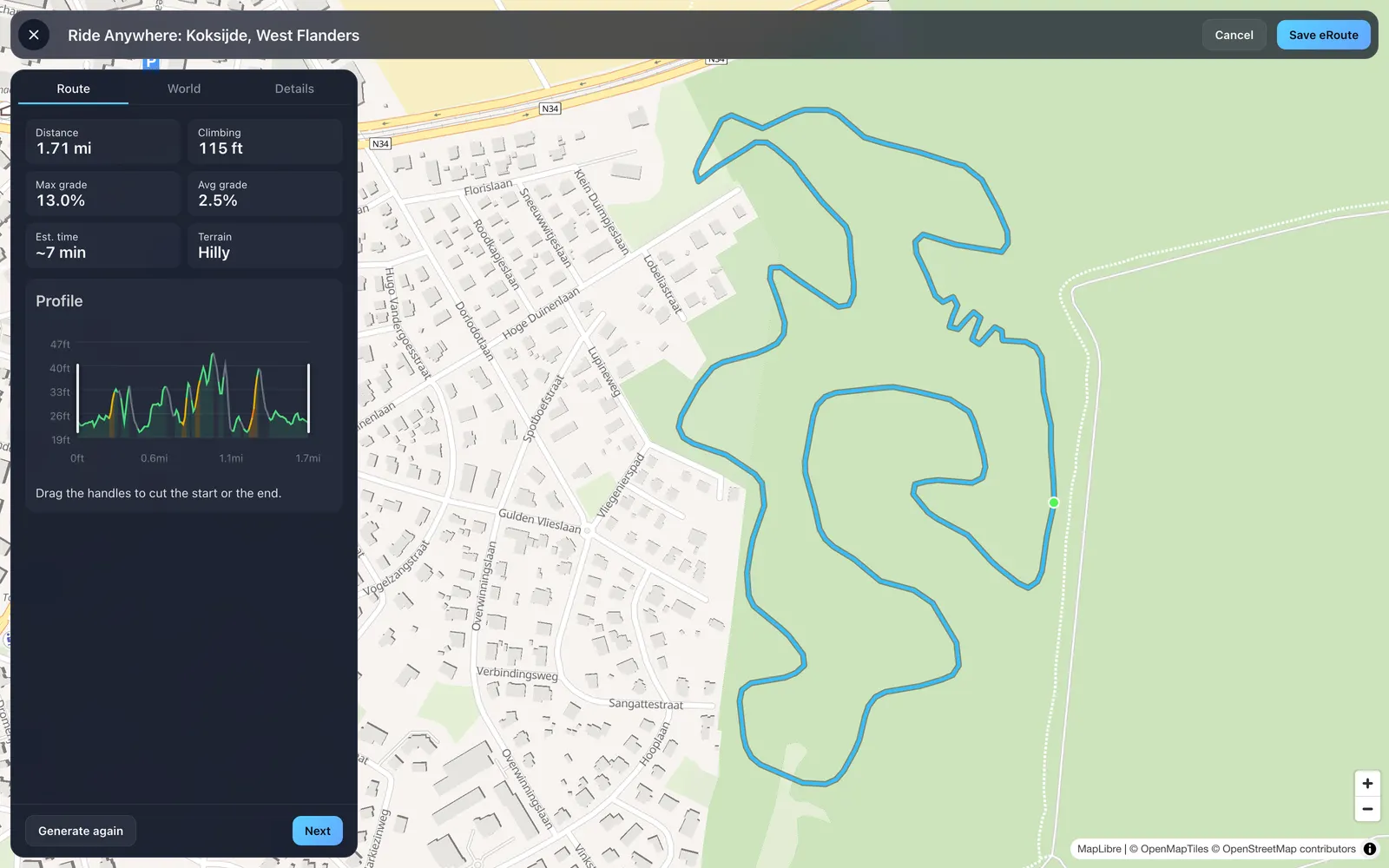
Tap a spot. Pick any start, set a distance, and get a loop from there on roads and paths. Or switch to Off-road, which is the part we are proudest of.
Off-road loops, almost anywhere
Choose Off-road, tap a park, a field or a wood, and tap Generate loop. The builder lays a lap across the open ground there, clear of roads, water and buildings: a lap made to be repeated. Leave the lap on Auto for 2 to 3 km, or ask for anything from 1 to 5 km. A longer lap needs more open ground. Not quite the lap you wanted? Generate again and get another.
It cleans up your GPS file, and shows its work
A recorded ride picks up junk: circling at a light, a wrong turn and back, the ride to and from the start. The builder finds them and lists each fix, numbered to match a mark on the map: a small loop removed, a wrong turn removed, a back and forth removed, a lead-in and lead-out trimmed. Undo any fix you want to keep. If the file is clean, it says so.
Elevation from a phone or a bike computer is noisy, so by default the builder swaps it for satellite terrain data. If your file came from a surveyed or RTK-quality recording, keep its own elevation instead. Then slide the smoothing between Less and More and see what it does as you slide: how much of the climbing is kept, the steepest grade, and how many sudden grade jumps are left per kilometre.
Trim it, loop it, check the numbers
Every route shows its distance, climbing, max and average grade, the kind of terrain, and an estimated time for a 200 W, 75 kg rider. Drag the handles on the elevation profile to cut the start or the end. If the route comes back to where it began, trim it to one lap with a tap, so riders can loop it.
Imported a ride with power? On the Power tab you can put that ride on the leaderboard: it is simulated on the new eRoute and becomes its first time when you save.
Pick the type of eRoute
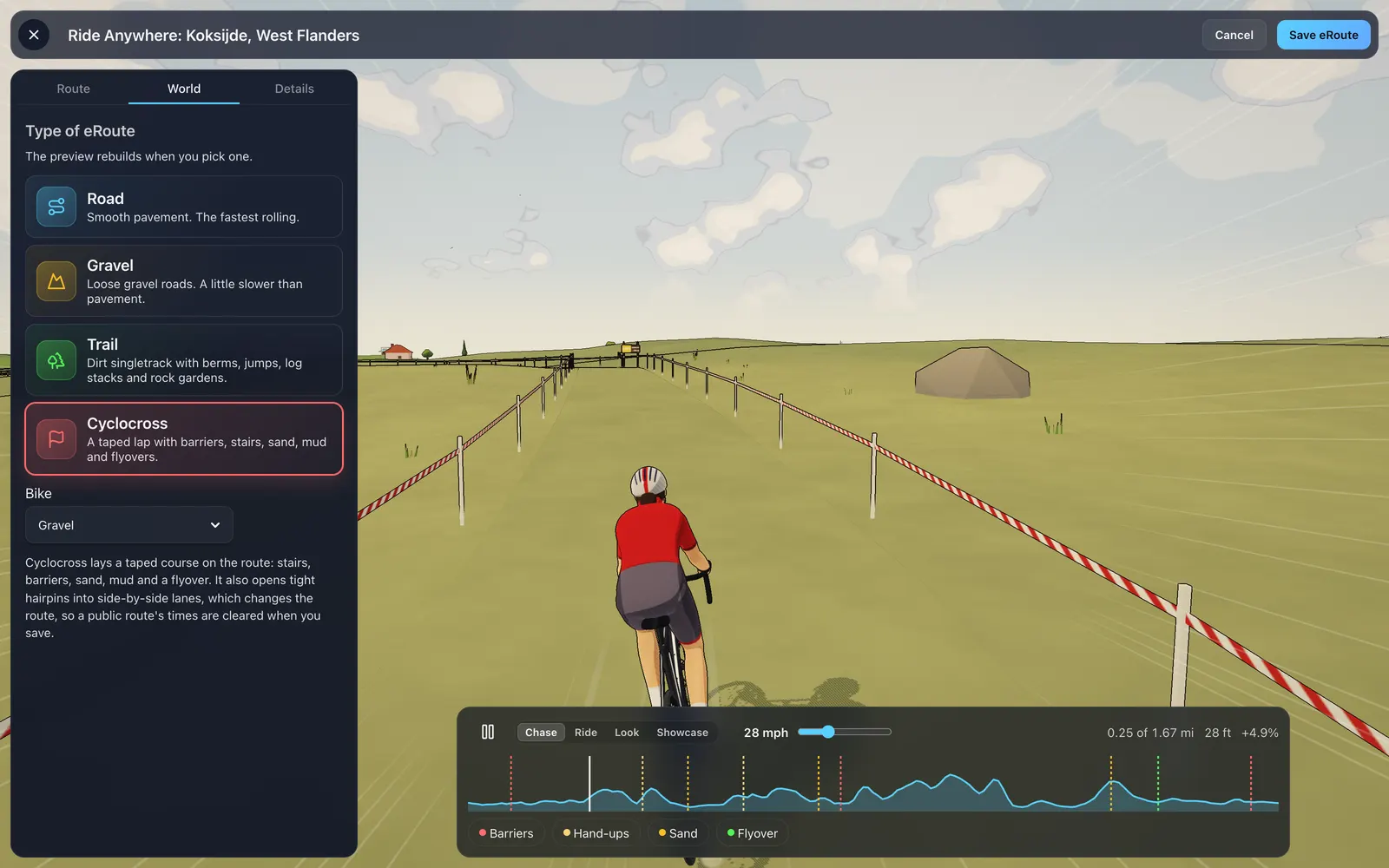
On the World tab, pick the Type of eRoute: Road, Gravel, Trail or Cyclocross, and the bike you will ride it on. The 3D world rebuilds on the spot. Road and Gravel change how fast the route rolls. Trail brings berms, jumps, log stacks and rock gardens. Cyclocross lays a taped course along it, with barriers, stairs, sand, mud and flyovers, and every place the route crosses itself becomes a flyover. Read all about it in Cyclocross eRoutes.
Preview any eRoute in 3D
The World tab flies your route in 3D while you build it, and now you can do the same with any eRoute before you ride it. Open one, tap the options button, then Preview eRoute.
A rider flies the route for you. Pause or play, and switch between four cameras: Chase, Ride, Look and Showcase. Speed it up to 150 km/h to see a long route in a few minutes. Drag along the elevation profile to jump anywhere, with your distance, height and grade shown as you go. On a loop, the preview laps the route just as your ride will.
On a cyclocross course, each feature is marked on the profile, and a tap jumps you to the next set of stairs, barriers, sand, flyover or hand-ups. Mud shows up when the weather has the ground wet. Seen enough? Tap Ride it! and go straight to setting up the ride. Nothing in a preview is recorded.
Get started
Open Ride Cave, go to the eRoutes page and tap New eRoute. Drop in a ride you love, or tap your local park and make a lap of it. Then fly it before you ride it, and tell us what you made.